> ## Documentation Index
> Fetch the complete documentation index at: https://help.notis.ai/llms.txt
> Use this file to discover all available pages before exploring further.
# Sync Skills
> Keep the right Notis skills available in Codex, Claude Code, Cursor, and Notis.
Skills Sync keeps your agent instructions in one place. Create or install a skill once, then choose which coding agents should have it.
This saves you from copying skills between agents, losing track of the latest version, or realizing mid-task that an agent does not know the workflow you already wrote somewhere else.
## How it helps
* **One shared skill library** — Skills you create in Notis can appear in Notis, Codex, Claude Code, and Cursor.
* **Local skills come back to Notis** — Skills you write for a local agent can sync back to your Notis account.
* **Choose the right agents** — Send each skill only to the agents that need it.
* **No duplicate cleanup** — Notis keeps one canonical copy when the same skill appears in multiple places.
## Turn it on
Skills Sync lives on the **Skills** page in the [Notis portal](https://app.notis.ai/skills).
1. Open [Notis](https://app.notis.ai) and go to **Skills**.
2. Find the **Desktop skill sync** card.
3. Turn on **Enable sync**.
4. Click **Sync Now**, or open the Notis desktop app and let it sync automatically.
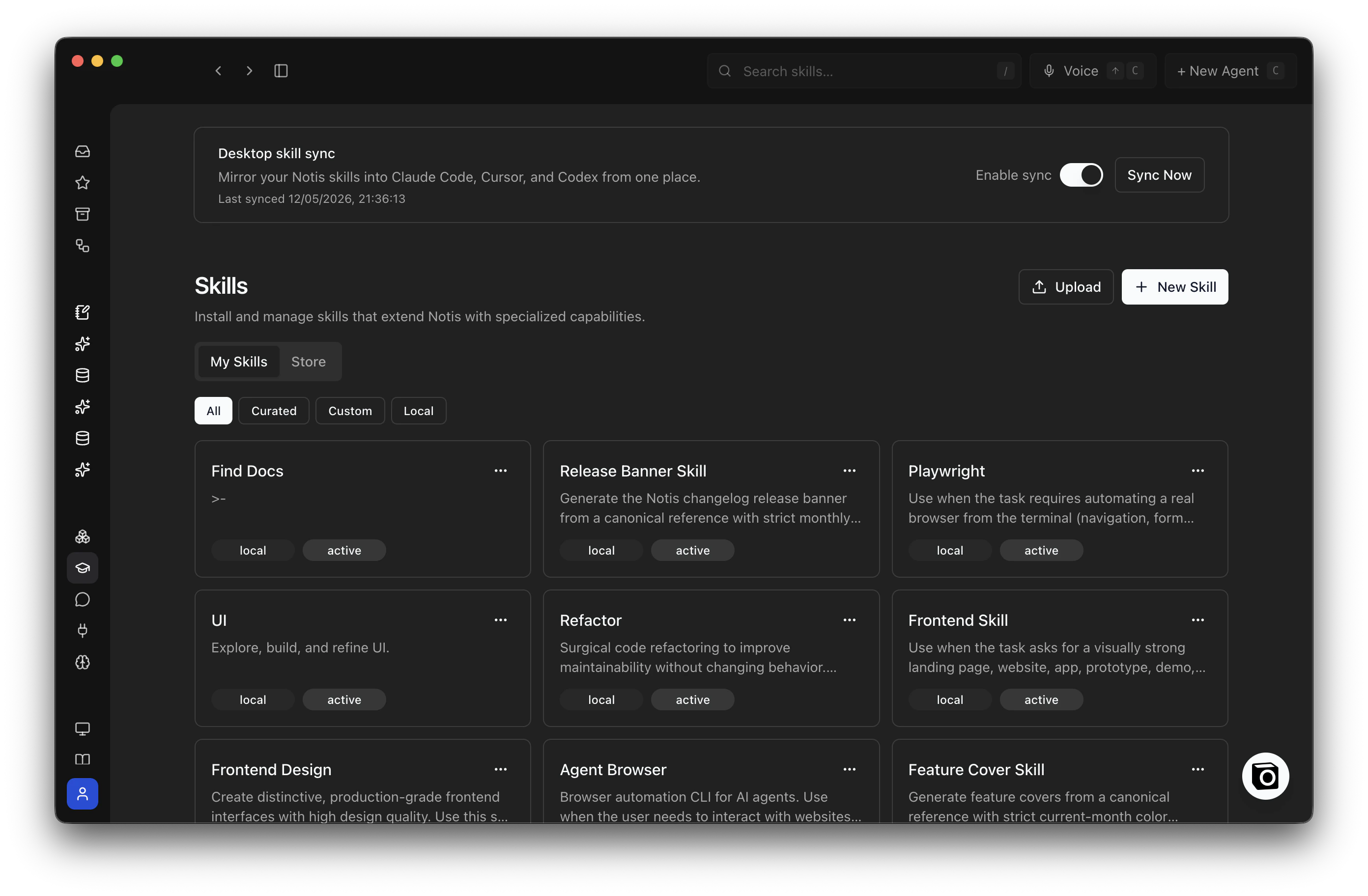 The card shows the last sync time after the first run.
## What syncs
* Skills installed or created in Notis.
* Local skills from Notis, Codex, Claude Code, and Cursor.
* Built-in skills such as `notis-cli` and `notis-apps`, when they are available to your account.
Curated skills from the Notis catalog are linked locally for use, but edited in the portal.
## Pick which agents get a skill
Open a skill in the [Notis portal](https://app.notis.ai/skills) and choose its agent targets:
* Notis
* Codex
* Claude Code
* Cursor
Turning an agent off removes the local link for that agent. It does not delete the skill.
## Pause sync
Go back to the **Desktop skill sync** card and turn **Enable sync** off. Existing local skills stay where they are, but new changes stop syncing until you turn it back on.
## FAQs
Delete skills from the **Skills** page in the [Notis portal](https://app.notis.ai/skills).
Deleting a skill directly inside Codex, Claude Code, or Cursor usually will not stick. On the next sync, Notis recreates the local link from your Notis account.
No for skills you own. Local edits are detected and pushed back to your Notis account on the next sync.
Curated catalog skills are read-only locally. Edit those from the portal instead.
It is removed from your local agent folders on the next sync.
Notis keeps the local mirror as a safety net, so files are not immediately wiped from disk.
Yes. Open the skill in Notis and turn off that agent's target.
This removes the local link for that agent without deleting the skill from Notis or from your other agents.
Yes. Sign in to the Notis desktop app on each computer with the same account.
Each computer keeps its own local mirror, and changes sync through your Notis account.
Notis only manages links it owns. If a real folder or non-Notis link already exists at that path, Notis skips it and continues syncing the rest.
Move the conflicting folder if you want Notis to manage that skill slot.
## Related
* [Sync Integrations](/agents/connect-integrations)
* [Ship Apps](/agents/build-and-ship-apps)
The card shows the last sync time after the first run.
## What syncs
* Skills installed or created in Notis.
* Local skills from Notis, Codex, Claude Code, and Cursor.
* Built-in skills such as `notis-cli` and `notis-apps`, when they are available to your account.
Curated skills from the Notis catalog are linked locally for use, but edited in the portal.
## Pick which agents get a skill
Open a skill in the [Notis portal](https://app.notis.ai/skills) and choose its agent targets:
* Notis
* Codex
* Claude Code
* Cursor
Turning an agent off removes the local link for that agent. It does not delete the skill.
## Pause sync
Go back to the **Desktop skill sync** card and turn **Enable sync** off. Existing local skills stay where they are, but new changes stop syncing until you turn it back on.
## FAQs
Delete skills from the **Skills** page in the [Notis portal](https://app.notis.ai/skills).
Deleting a skill directly inside Codex, Claude Code, or Cursor usually will not stick. On the next sync, Notis recreates the local link from your Notis account.
No for skills you own. Local edits are detected and pushed back to your Notis account on the next sync.
Curated catalog skills are read-only locally. Edit those from the portal instead.
It is removed from your local agent folders on the next sync.
Notis keeps the local mirror as a safety net, so files are not immediately wiped from disk.
Yes. Open the skill in Notis and turn off that agent's target.
This removes the local link for that agent without deleting the skill from Notis or from your other agents.
Yes. Sign in to the Notis desktop app on each computer with the same account.
Each computer keeps its own local mirror, and changes sync through your Notis account.
Notis only manages links it owns. If a real folder or non-Notis link already exists at that path, Notis skips it and continues syncing the rest.
Move the conflicting folder if you want Notis to manage that skill slot.
## Related
* [Sync Integrations](/agents/connect-integrations)
* [Ship Apps](/agents/build-and-ship-apps)