> ## Documentation Index
> Fetch the complete documentation index at: https://help.notis.ai/llms.txt
> Use this file to discover all available pages before exploring further.
# Blog & Newsletter
> Notis turns rough ideas into publish-ready blog posts and newsletters, complete with research, writing in your style, and custom images.
## Quick start: speak these
> *Draft a blog post comparing Notis with Poke, Memorae, and Zapier. Do deep research on the web and explore my Notion workspace.*
> *Generate a funny cartoon header for the blog post.*
> *Please publish the blog post on Framer.*
Notis researches, writes, illustrates, and publishes your content.
## Blog & newsletter workflow
### 1. Share your idea
Start with a rough concept — voice or text:
> *I want to write about how AI tools are changing content creation...*
> *Draft a blog post comparing our features with competitors.*
> *Write a newsletter about our product launch.*
### 2. Notis does deep research
Notis researches across multiple sources:
* Web search for current information
* Your Notion workspace for internal context
* Competitor analysis when requested
Response:
> *I've researched across the web and your Notion workspace. Here's your draft comparing Notis with Poke, Memorae, and Zapier.*
### 3. Review and refine the draft
Ask for style adjustments:
> *Update the style to match my previous competitor comparisons.*
> *Make it more conversational.*
> *Add more data points.*
### 4. Generate custom images
Request visuals for your content:
> *Generate a funny cartoon header for the blog post.*
> *Create a hero image about productivity.*
> *Make an infographic summarizing the key points.*
Notis generates and adds images to your draft.
### 5. Save it in Notion
When you're ready:
> *Please save it in my Blog & Newsletter database.*
## Set up your Blog & Newsletter database in Notion
The Notis Second Brain already contains a [Blog & Newsletter database](/get-started/notion) set up for you.
You can easily create a Blog & Newsletter database or customize the one that comes with the template. Just make sure it has a title property and Notis will understand it should be used for blogging.
## Optional - Set up with Framer
If you want your Notion blog database to power your website, you can connect it to [Framer](https://www.framer.com/):
1. Create your Framer site (or open an existing one).
2. In Framer, add a CMS collection and choose the option to sync it with Notion, then connect it to your **Blog & Newsletter** database.
3. Map your Notion properties to Framer fields (for example: title, meta description, publish date, status, header image, and content).
4. Configure which entries should be published (for example, only pages with `Status = published`).
5. Publish your Framer site.
## Automations
### Write a blog post from a content extract
Use this automation to turn any new piece of content (notes, transcript, outline) into a draft blog post in your Blog database.
1. In the [Notis portal](https://app.notis.ai), open the **Automations** tab and create a new automation.
2. Choose a trigger that runs when you capture a new content extract (for example, from a form, webhook, or a Notion page update).
3. Paste and adapt this instruction:
```
A new content extract was captured.
Goal:
Write a blog post from the extract below.
Process:
1. Generate 1 16:9 illustration for the header of the blog post.
2. Generate 3 additional illustrations in different formats to illustrate the article.
3. Write the full article and save it to my Blog database.
Rules:
- Do not use H1 titles.
- The blog post cannot start with a title.
- Insert images in the main content of the Notion page.
- Do not sign the blog post.
- Write in the voice of Flo, the founder and creator of Notis.
```
### Competitor comparison posts
Use this automation when you regularly publish “Notis vs X” articles.
1. Create a simple database to track your competitors.
2. In the [Notis portal](https://app.notis.ai), create a new webhook automation.
3. Set up this webhook to fire every time a new entry is added in your competitors’ database.
4. Paste and adapt this instruction:
```
Create a blog post comparing the competitor below against Notis.
Requirements:
- Do deep research on the competitor: features, pricing, integrations, reviews, workflows, limitations, and target audience.
```
### Draft a newsletter from the latest release
Use this automation to turn your latest published changelog into a ready-to-send newsletter.
1. Create a simple database to track your changelog.
2. In the [Notis portal](https://app.notis.ai), create a new webhook automation.
3. Set up this webhook to fire every time a new entry is added in your changelog database.
4. Paste and adapt this instruction:
```
Draft the latest release newsletter.
Requirements:
- Gather the linked features and bugs for the draft release.
- Add a short section with relevant AI news since the last release.
- Generate a header image for the release.
- Use a clear structure: intro, main features, other small improvements, AI news.
```
## Pro tips
* **Reference existing content**: "Write in the same style as my last blog post".
* **Specify research depth**: "Do deep research" triggers comprehensive analysis.
* **Include internal context**: "Check my Notion workspace for relevant data".
* **Batch images**: Request a hero image and a social preview in one go.
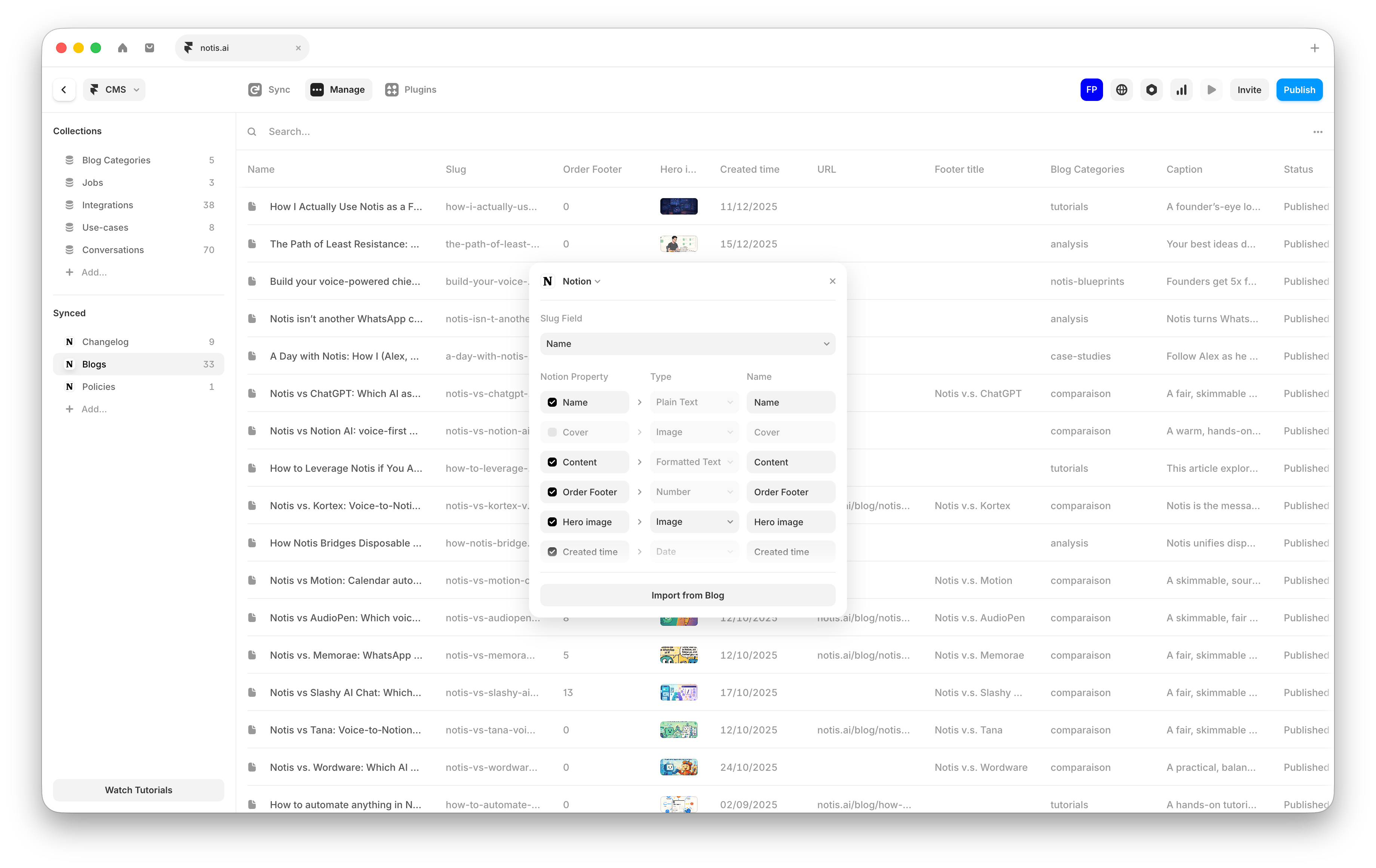 If you want your Notion blog database to power your website, you can connect it to [Framer](https://www.framer.com/):
1. Create your Framer site (or open an existing one).
2. In Framer, add a CMS collection and choose the option to sync it with Notion, then connect it to your **Blog & Newsletter** database.
3. Map your Notion properties to Framer fields (for example: title, meta description, publish date, status, header image, and content).
4. Configure which entries should be published (for example, only pages with `Status = published`).
5. Publish your Framer site.
## Automations
### Write a blog post from a content extract
Use this automation to turn any new piece of content (notes, transcript, outline) into a draft blog post in your Blog database.
1. In the [Notis portal](https://app.notis.ai), open the **Automations** tab and create a new automation.
2. Choose a trigger that runs when you capture a new content extract (for example, from a form, webhook, or a Notion page update).
3. Paste and adapt this instruction:
```
A new content extract was captured.
Goal:
Write a blog post from the extract below.
Process:
1. Generate 1 16:9 illustration for the header of the blog post.
2. Generate 3 additional illustrations in different formats to illustrate the article.
3. Write the full article and save it to my Blog database.
Rules:
- Do not use H1 titles.
- The blog post cannot start with a title.
- Insert images in the main content of the Notion page.
- Do not sign the blog post.
- Write in the voice of Flo, the founder and creator of Notis.
```
### Competitor comparison posts
Use this automation when you regularly publish “Notis vs X” articles.
1. Create a simple database to track your competitors.
2. In the [Notis portal](https://app.notis.ai), create a new webhook automation.
3. Set up this webhook to fire every time a new entry is added in your competitors’ database.
4. Paste and adapt this instruction:
```
Create a blog post comparing the competitor below against Notis.
Requirements:
- Do deep research on the competitor: features, pricing, integrations, reviews, workflows, limitations, and target audience.
```
### Draft a newsletter from the latest release
Use this automation to turn your latest published changelog into a ready-to-send newsletter.
1. Create a simple database to track your changelog.
2. In the [Notis portal](https://app.notis.ai), create a new webhook automation.
3. Set up this webhook to fire every time a new entry is added in your changelog database.
4. Paste and adapt this instruction:
```
Draft the latest release newsletter.
Requirements:
- Gather the linked features and bugs for the draft release.
- Add a short section with relevant AI news since the last release.
- Generate a header image for the release.
- Use a clear structure: intro, main features, other small improvements, AI news.
```
## Pro tips
* **Reference existing content**: "Write in the same style as my last blog post".
* **Specify research depth**: "Do deep research" triggers comprehensive analysis.
* **Include internal context**: "Check my Notion workspace for relevant data".
* **Batch images**: Request a hero image and a social preview in one go.
If you want your Notion blog database to power your website, you can connect it to [Framer](https://www.framer.com/):
1. Create your Framer site (or open an existing one).
2. In Framer, add a CMS collection and choose the option to sync it with Notion, then connect it to your **Blog & Newsletter** database.
3. Map your Notion properties to Framer fields (for example: title, meta description, publish date, status, header image, and content).
4. Configure which entries should be published (for example, only pages with `Status = published`).
5. Publish your Framer site.
## Automations
### Write a blog post from a content extract
Use this automation to turn any new piece of content (notes, transcript, outline) into a draft blog post in your Blog database.
1. In the [Notis portal](https://app.notis.ai), open the **Automations** tab and create a new automation.
2. Choose a trigger that runs when you capture a new content extract (for example, from a form, webhook, or a Notion page update).
3. Paste and adapt this instruction:
```
A new content extract was captured.
Goal:
Write a blog post from the extract below.
Process:
1. Generate 1 16:9 illustration for the header of the blog post.
2. Generate 3 additional illustrations in different formats to illustrate the article.
3. Write the full article and save it to my Blog database.
Rules:
- Do not use H1 titles.
- The blog post cannot start with a title.
- Insert images in the main content of the Notion page.
- Do not sign the blog post.
- Write in the voice of Flo, the founder and creator of Notis.
```
### Competitor comparison posts
Use this automation when you regularly publish “Notis vs X” articles.
1. Create a simple database to track your competitors.
2. In the [Notis portal](https://app.notis.ai), create a new webhook automation.
3. Set up this webhook to fire every time a new entry is added in your competitors’ database.
4. Paste and adapt this instruction:
```
Create a blog post comparing the competitor below against Notis.
Requirements:
- Do deep research on the competitor: features, pricing, integrations, reviews, workflows, limitations, and target audience.
```
### Draft a newsletter from the latest release
Use this automation to turn your latest published changelog into a ready-to-send newsletter.
1. Create a simple database to track your changelog.
2. In the [Notis portal](https://app.notis.ai), create a new webhook automation.
3. Set up this webhook to fire every time a new entry is added in your changelog database.
4. Paste and adapt this instruction:
```
Draft the latest release newsletter.
Requirements:
- Gather the linked features and bugs for the draft release.
- Add a short section with relevant AI news since the last release.
- Generate a header image for the release.
- Use a clear structure: intro, main features, other small improvements, AI news.
```
## Pro tips
* **Reference existing content**: "Write in the same style as my last blog post".
* **Specify research depth**: "Do deep research" triggers comprehensive analysis.
* **Include internal context**: "Check my Notion workspace for relevant data".
* **Batch images**: Request a hero image and a social preview in one go.