

How it helps
- One shared skill library — Skills you create in Notis can appear in Notis, Codex, Claude Code, and Cursor.
- Local skills come back to Notis — Skills you write for a local agent can sync back to your Notis account.
- Choose the right agents — Send each skill only to the agents that need it.
- No duplicate cleanup — Notis keeps one canonical copy when the same skill appears in multiple places.
Automatic updates
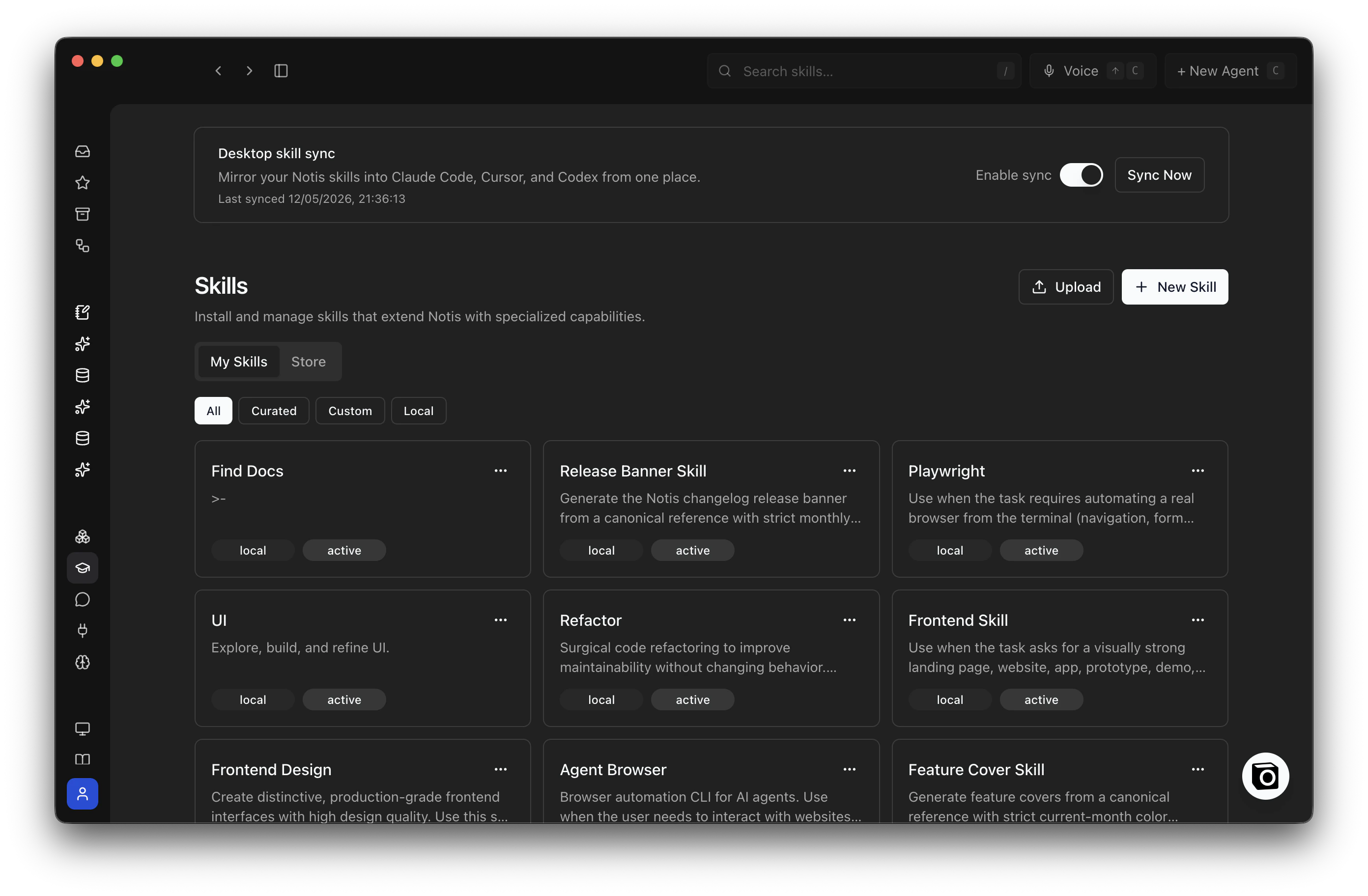
Skills Sync lives on the Skills page in the Notis portal.- Open Notis and go to Skills.
- Find the Automatic sync card.
- Turn on Keep syncing and confirm when you want your account skills to refresh automatically.
- Click Sync Now whenever you want an immediate refresh.
What syncs
- Skills installed or created in Notis.
- Local skills from Notis, Codex, Claude Code, and Cursor.
- The three built-in Notis skills for apps, database queries, and Notis commands. These stay available even when automatic updates are paused.
Pick which agents get a skill
Open a skill in the Notis portal and choose its agent targets:- Notis
- Codex
- Claude Code
- Cursor
Pause sync
Go back to the Automatic sync card and turn Keep syncing off. This pauses regular background updates on your connected computers. Existing local skills stay where they are, the three built-in Notis skills stay current, and Sync Now still works.FAQs
Where should I delete a skill?
Where should I delete a skill?
Delete skills from the Skills page in the Notis portal.Deleting a skill directly inside Codex, Claude Code, or Cursor usually will not stick. On the next sync, Notis recreates the local link from your Notis account.
Will my local changes be overridden?
Will my local changes be overridden?
No for skills you own. Local edits are detected and pushed back to your Notis account on the next sync.Curated catalog skills are read-only locally. Edit those from the portal instead.
What happens if I delete a skill in Notis?
What happens if I delete a skill in Notis?
It is removed from your local agent folders on the next sync.Notis keeps the local mirror as a safety net, so files are not immediately wiped from disk.
Can I hide a skill from only one agent?
Can I hide a skill from only one agent?
Yes. Open the skill in Notis and turn off that agent’s target.This removes the local link for that agent without deleting the skill from Notis or from your other agents.
What if a folder already exists where Notis wants to sync?
What if a folder already exists where Notis wants to sync?
Notis only manages links it owns. If a real folder or non-Notis link already exists at that path, Notis skips it and continues syncing the rest.Move the conflicting folder if you want Notis to manage that skill slot.